Connect Cloudflare
Connect Cloudflare usage-based charges with a Billing Read account token and see credits and unpaid debt.
Connect Cloudflare
Bring Cloudflare's usage-based charges (Workers, R2, D1, Workers AI and more) into CostGlass with a read-only account API token.
- You create an Account API token with a single permission, Account → Billing → Read, and paste it with your 32-character Account ID.
- CostGlass reads Cloudflare's Billable Usage API, which is in alpha. It covers usage-based charges on self-serve (pay-as-you-go) accounts only.
- Fixed-fee plans such as Pro or Business, and Enterprise contract accounts, are not in that feed, so a connected account can legitimately show no spend.
- CostGlass says so when nothing comes back. It never invents a figure.
- The card can also show your remaining Cloudflare credit and any unpaid invoices.
- You can connect several Cloudflare accounts. Each account can be connected once.
What is and is not covered
Be clear about this before you connect, because it decides whether you will see numbers.
| Cloudflare billing | Shown in CostGlass? |
|---|---|
| Usage-based charges on a self-serve (pay-as-you-go) account: Workers, R2, D1, Workers AI, Vectorize, Images, Stream and similar | Yes |
| Fixed-fee plan subscriptions (for example a Pro or Business plan) | No. They are not in the feed. |
| Enterprise contract accounts | No. They are not in the feed. |
| A free account with no usage-based products | Nothing to show. It connects and reports that no usage was found. |
- A Cloudflare account where you can create Account API tokens.
- Your Account ID (see below).
- An owner or admin account in CostGlass, and room in your plan for another connection.
Step by step
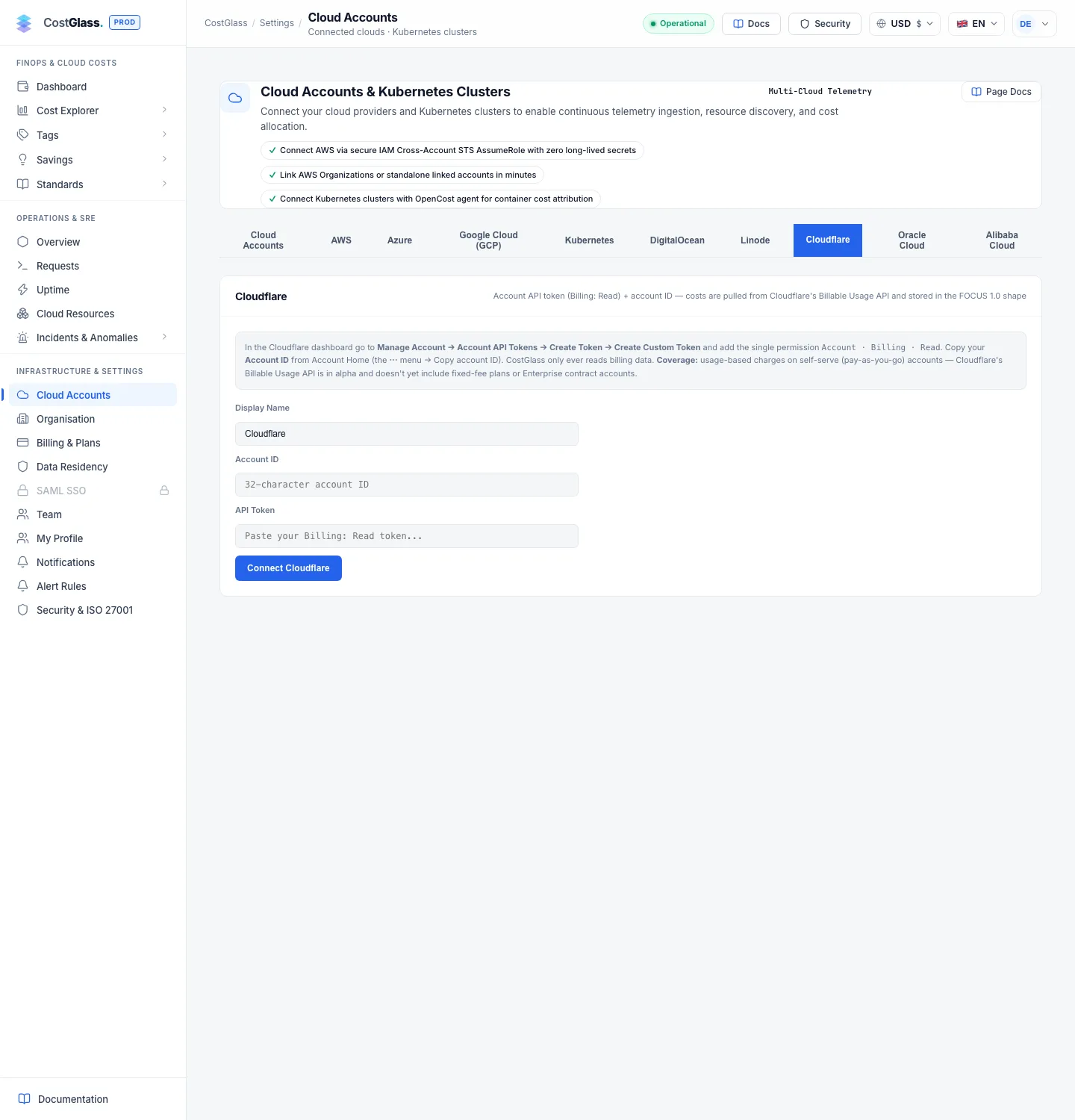
What CostGlass checks when you connect
CostGlass asks Cloudflare for the account's billable-usage information. That one call proves the token is valid, has Billing → Read on that account, and that the Account ID is right. If any of that is wrong you see a message and nothing is stored. The token is saved only in CostGlass's encrypted secrets store.
You then see one of two results:
| Result | What you see | Meaning |
|---|---|---|
| Usage found | A "Cloudflare Successfully Connected!" panel, then the card with a record count. | Usage-based charges were read. |
| No usage found | A warning panel, "Cloudflare connected, no usage found yet", with Cloudflare's own answer. | The token is valid, but Cloudflare returned no usage-based billing. The account stays connected and is picked up automatically once Cloudflare reports usage. |
About the “covered” flag
Cloudflare's information call includes a field called covered, which its documentation does not define. A non-Enterprise account has been seen to report covered=false and still have a valid token. For that reason CostGlass never treats it as a yes or no. It always tries to read usage, and decides from what comes back. The "no usage found" message quotes what Cloudflare said (for example "covered=false, 0 subscription(s)") and lists the possible reasons, without claiming which one applies to you.
What data you will see
- Cost per Cloudflare product, split by zone (your domain) where Cloudflare gives one, so you can see which zone a charge belongs to. In CostGlass the zone appears as the resource.
- Daily figures where Cloudflare reports daily charges, plus monthly totals for each complete calendar month.
- The current month is shown month to date. A monthly total is written only for a calendar month the fetched data fully covers, so a partial sync cannot overwrite a correct full month.
- A rough product category for each service (for example Workers is Compute, R2 is Storage, D1 is Databases, Workers AI is AI and Machine Learning). This is CostGlass's mapping, not Cloudflare's.
- The first sync looks back through up to 14 of your Cloudflare billing periods; later syncs refresh the latest three.
- What is actually billed is used as the cost. A product that billed nothing stores nothing.
Cloudflare's billing period starts on an anchor day of your own, but CostGlass reports in calendar months to match every other cloud, so a figure for a month may be built from parts of two Cloudflare billing periods. Costs show up in Cost Explorer and Reports next to your other clouds.
Credits and unpaid-debt badges
Each sync also reads two small pieces of account information, so the Cloudflare card can show financial signals alongside spend. They are best effort: if one fails the sync still succeeds, and they show even for an account that has no usage yet.
- Credit badge
- Shown when the account has a credit. It reads like "Credit US$50.00 of US$100.00 · 50% used · 276 days left". Hover for the dates the credit is valid and, when Cloudflare provides it, the date it is projected to run out.
- Unpaid badge
- Shown when Cloudflare reports unpaid invoices. It reads like "Unpaid US$123.45 · status". Hover to see how many invoices and the status Cloudflare gives.
Syncing, several accounts, disconnecting
- CostGlass syncs every six hours. Click Sync Now on the Cloudflare tab to sync all your connected Cloudflare accounts now.
- Each account appears as its own card. One Cloudflare account can only be connected once to your organisation, but you can connect several different accounts.
- Disconnect asks you to confirm, stops syncing and deletes the stored token. Cost data already collected is kept.