Connect DigitalOcean
Connect DigitalOcean accounts with a read-only personal access token and see invoices by month.
Connect DigitalOcean
Connect one or more DigitalOcean accounts with a read-only personal access token so their invoices appear next to your other cloud costs.
- You paste a DigitalOcean personal access token. There is nothing to install or deploy.
- The token is checked against DigitalOcean before it is stored. A bad token is rejected and nothing is saved.
- CostGlass reads billing history and invoices only. It does not read or change your droplets or other resources.
- DigitalOcean reports costs by month, so expect monthly figures, not daily ones.
- You can connect several DigitalOcean accounts. Each has its own card, sync status and token.
How it works
DigitalOcean has no bulk cost export, so CostGlass polls DigitalOcean's billing API with your token on a schedule. The token is kept in CostGlass's encrypted secrets store, never in the page or the database row, and is not shown again after you save it.
- A DigitalOcean account where you can create API tokens (an owner, or someone with that permission).
- An owner or admin account in CostGlass, and room in your plan for another connection.
Step by step
costglass-readonly, choose a read-only scope that includes billing, and set an expiry you are comfortable with. Copy the token straight away. DigitalOcean shows it only once. It starts with dop_v1_.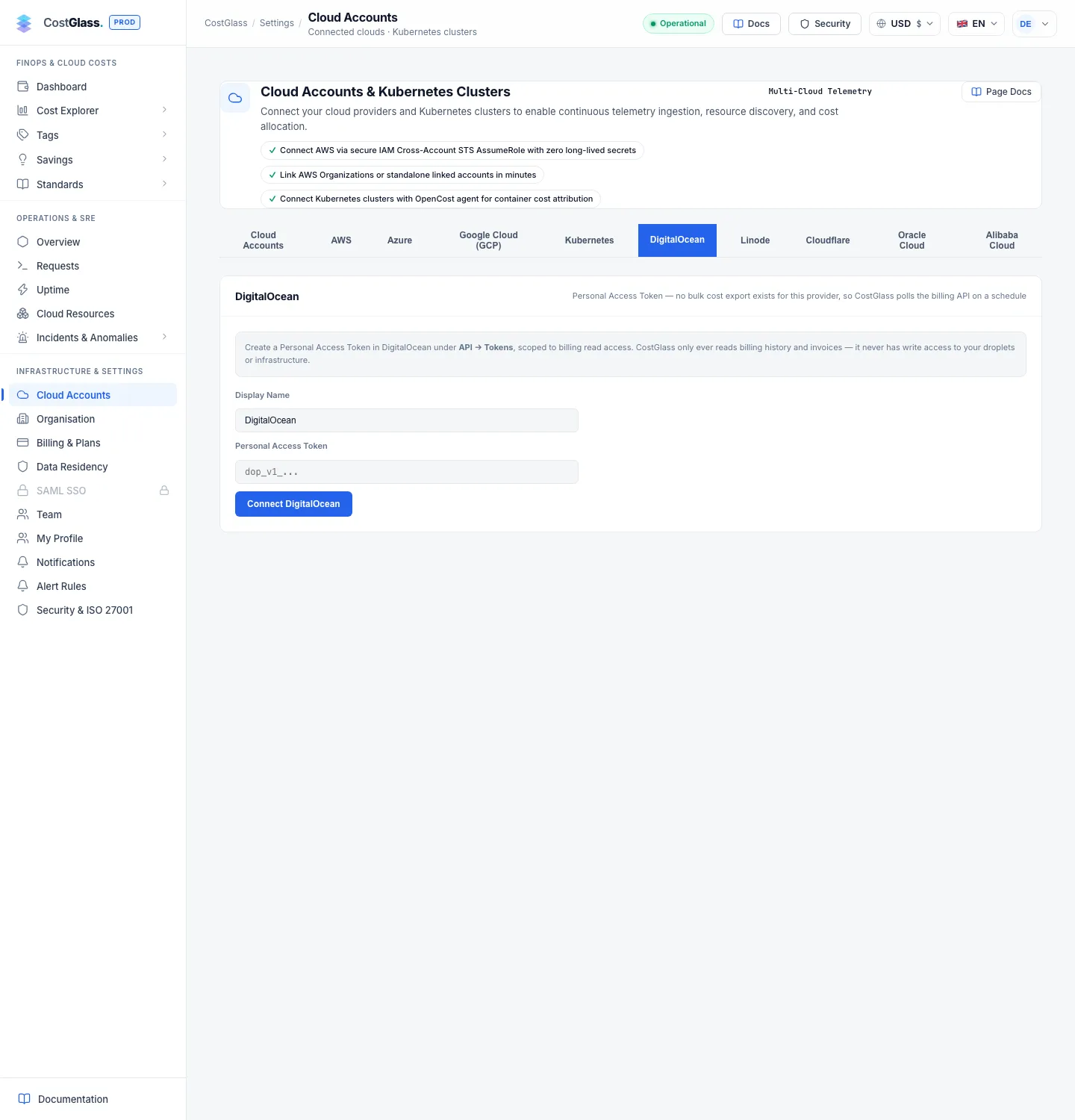
If DigitalOcean rejects the token you see a message such as DigitalOcean rejected this token (HTTP 401) with a reminder to check that it has billing read access and has not expired. Connecting the same DigitalOcean account twice is refused.
What data you will see
| Data | Detail |
|---|---|
| Closed invoices | The most recent 25 invoices, split by product (for example Droplets, Databases, Kubernetes). One monthly figure per product. |
| Current month so far | One row labelled "DigitalOcean Usage (Month to Date)", taken from DigitalOcean's invoice preview. It is a single total, not split by product, because DigitalOcean gives no item detail for a month that has not closed. |
| Credits and refunds | Negative invoice items are stored as credits, separately from usage, so they are not netted into your service costs. |
| Currency | USD. |
| Daily figures | Not available. DigitalOcean only reports by invoice month, so daily charts, daily anomaly detection and day-by-day views do not include DigitalOcean. |
| Regions and resources | Not available. DigitalOcean invoice items carry no region or resource ID, so you cannot break DigitalOcean cost down by region or resource. |
Costs appear in Cost Explorer, Reports and the dashboard alongside your other clouds. Because the data is monthly, a month's figure may change until DigitalOcean closes the invoice.
Syncing and the live figure
- CostGlass syncs every six hours. Click Sync Now on an account's card to sync that account immediately; Sync all appears when you have two or more accounts.
- Each card shows the last sync time, the status and the number of records.
- Below the status the card also shows Live current period: the current month so far, fetched directly from DigitalOcean. To avoid hitting DigitalOcean's API on every page view, your browser keeps the answer for up to 30 minutes and then labels it (cached ≤30 min). Click Refresh Now to fetch it again. This is separate from the six-hourly sync that fills your reports.
- The token never reaches your browser. CostGlass fetches the live figure on your behalf and only the small summary is cached.
Several DigitalOcean accounts
Click + Add another DigitalOcean account to connect another account with its own token. Each account has its own card, sync status and live figure, and one failing token does not stop the others. Disconnecting an account asks you to confirm and deletes its stored token; cost already collected is kept.